The family photos are on your phone. The big screen is right there.
Sconce. Cast photos
& videos to the TV.
Pick what you want, send it to the Chromecast, and let it run.
Your photos keep playing on the TV after you lock your phone. Videos stream from the
phone, so keep Sconce open while one plays.
No ads
No accounts
No subscriptions
Your photos and videos go from this phone to your TV over your
own Wi-Fi. We never upload them.
Casting needs the internet: your TV loads Sconce's TV screen from
sconce.zone7studios.com, and casting uses Google's Cast framework, which is
covered by Google's
privacy policy.
Sconce also uses the network for the store's billing for the
one-time purchase. Read the privacy page →
Thirty seconds with Sconce
Your best photos live on the smallest screen in the house.
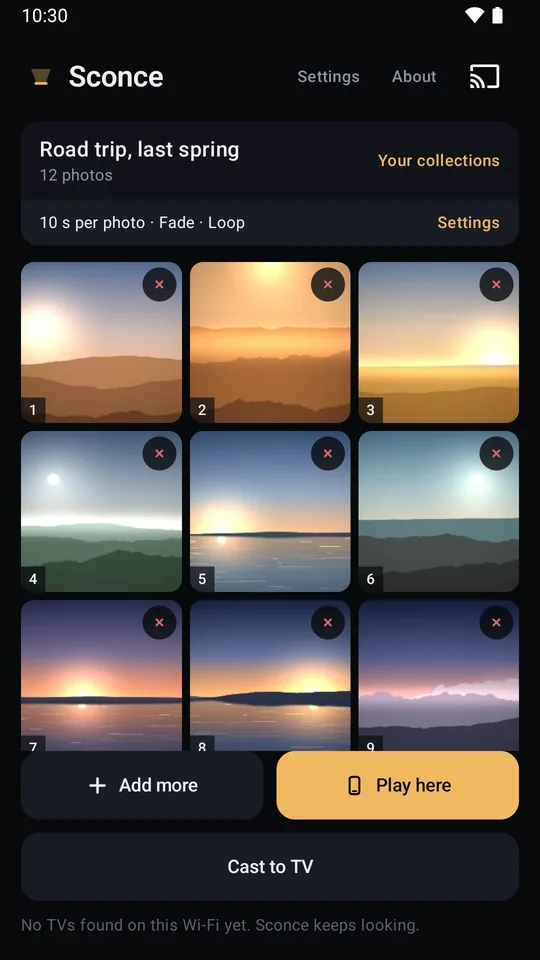
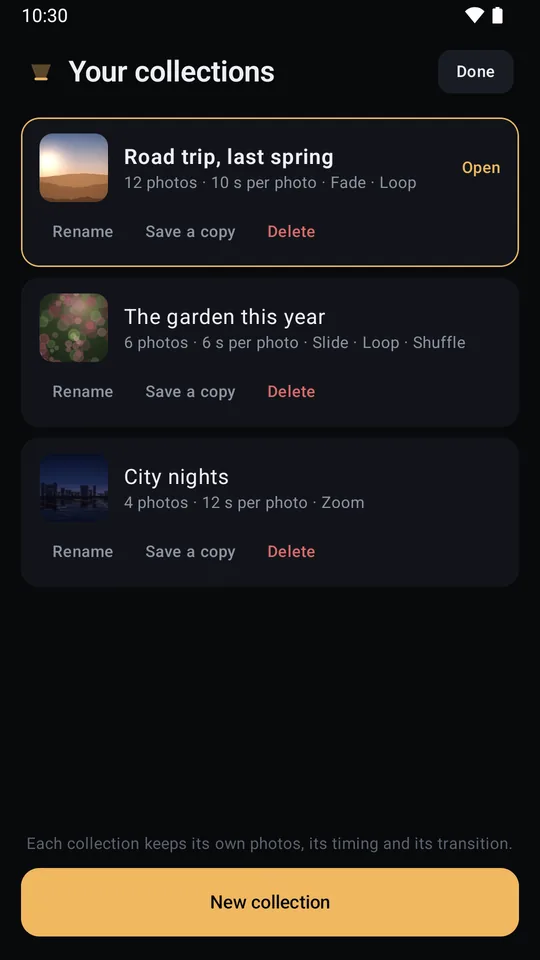
Sconce puts them up on the television: pick your photos and videos, save
them as a collection, send it to your Chromecast, and the pictures keep
turning with the phone locked in your pocket.
Why it exists
Everyone has the same evening: a phone full of the weekend,
a television three metres away, and no comfortable way to get one onto the
other. The apps that promise to fix it mostly want a weekly fee, an account,
and a run of ads between your own holiday photos.
Sconce is the boring version. You pick the photos and videos,
they go up on the TV over your own Wi-Fi, and the app gets out of the way.
One purchase unlocks the extras, and that is the last time money is
mentioned.
The two halves, and the honest difference
Photos and a video are not the same job, and an app
that pretends otherwise is setting you up for a black screen. Sconce says
which is which, on the screen, the first time you cast.
Photos
The pictures are handed to the TV up front, so the television is
holding the pictures, not your phone. Wander off, put the phone in your
pocket, lock it, and the slides keep turning.
Your photos keep playing on the TV after you lock your phone.
Videos
A video is far too big to hand over up front, so it streams from the
phone to the TV while it plays. That means the phone has to stay awake
and stay on the Wi-Fi for as long as the video runs.
Videos stream from this phone, so keep the app open while one plays.
Put both in one collection and Sconce
handles the join for you: the photos run themselves, and when a video comes
up it takes over the screen and hands back afterwards.
How it looks on the wall
Nothing is cropped by default
A portrait photo on a wide TV is the normal case, not the exception. Sconce fits the whole picture on screen over a soft, darkened blur of the same photo, so the panel is filled without anybody losing the top of their head. If you would rather it filled the panel, Fill the screen does that, and says on the switch that it is a zoom. It starts off, and it is there for everybody.
Choose what surrounds the picture
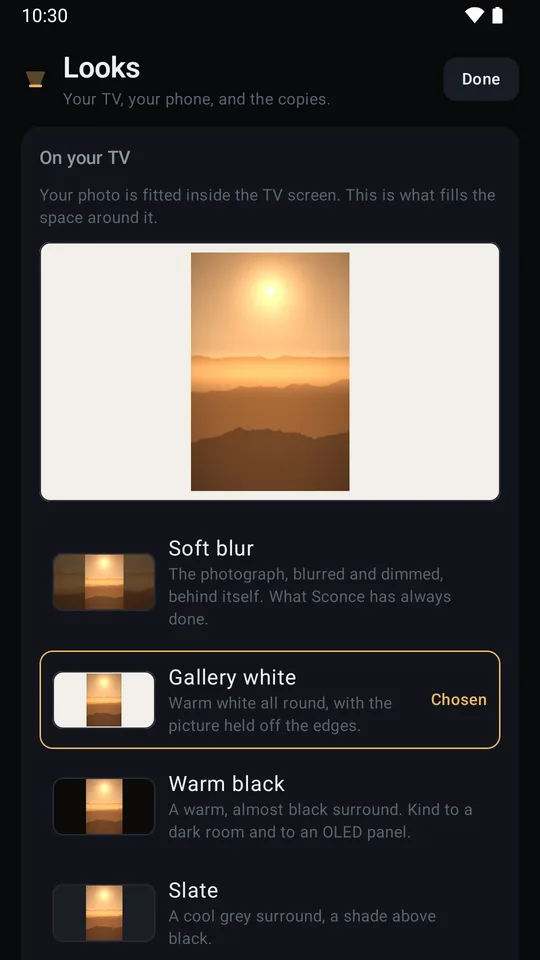
Six looks for the television: the blurred, dimmed copy of the photo itself that Sconce has always drawn, the same thing with the corners taken down, and four solid surrounds that hold the picture off the edges like a mount, in warm white, warm black, cool grey and a soft paper colour. The blurred fill is where every install starts. The other five are part of Sconce Pro.
Something behind the photographs
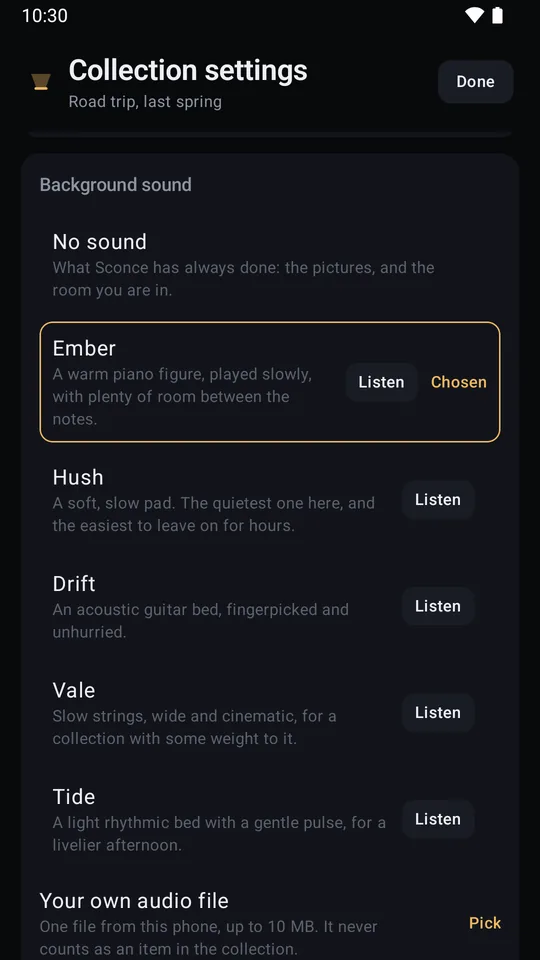
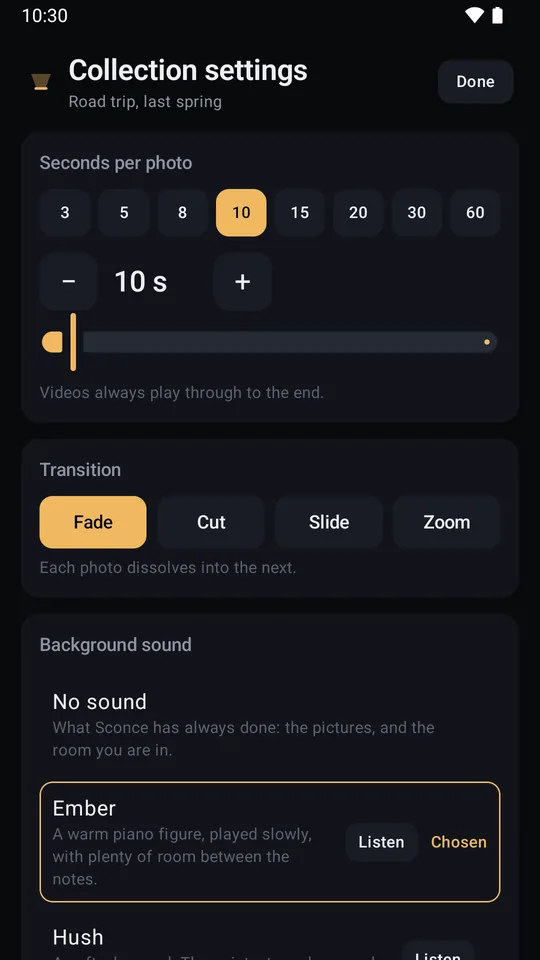
A collection can play a background sound under its pictures: one of five that come with the app, or an audio file of your own. It is set per collection, so a wedding and a beach afternoon need not share one. A video takes the sound over completely while it plays, and the background sound picks up where the video interrupted it. Part of Sconce Pro, and without it a collection plays silently, which is what Sconce has always done.
Upright, every time
Photos are turned the right way up before they are sent, so a holiday shot taken sideways arrives the way you took it.
When nothing is playing
Press stop and the television holds a quiet Sconce page rather than dropping you somewhere else, then hands itself back a few minutes later so the TV goes wherever it normally would. That page is silent, whatever was playing. The lamp is what every install shows; Sconce Pro can make it the name on its own, or nothing at all.
Made for a dim room
Dark ground, warm light, big type, and no animation that a small streaming stick would struggle with. A television is looked at from three metres, not thirty centimetres.
The practical half
The television does the looking. This is the phone's half of
the job.
The phone is the remote
Play, pause, back and next from the phone, and pause or stop from your lock screen. Every choice is made on the phone in your hand.
The phone can be the screen
No Chromecast in the room, or a router that will not let the two devices talk? Play here runs the same collection on the phone or tablet in front of you, with the same timings, the same transitions and the same background sound.
A video your TV cannot play
Some televisions refuse a clip a phone records happily. Sconce can convert one on the phone, using the phone's own video chip, and keeps the converted copy beside the original so it is only done once. Sconce Pro converts a whole collection in one go.
It tells you what it is doing
How many of the photos the TV is holding, whether it is safe to lock the phone yet, and, if the TV can't reach the phone, what to try, in plain words.
One purchase, no clock
Sconce Pro is a single purchase through the store you installed the app from, and it stays bought. It makes as many collections as you like, chooses what the TV shows around a photo and what plays behind it, sets the timing and the order, and converts a whole collection in one go. Nothing renews, and there is nothing to cancel.
What Sconce will never do
Not settings you have to find and switch off. Not in the app
at all.
- Ask for an account or a sign-in
- Carry an ad, or an ad SDK
- Put a watermark on your TV
- Charge you weekly, monthly or yearly
- Upload your photos or videos anywhere
- Beg you for a rating
- Interrupt your photos with an upsell
Sconce casts to Chromecast and Google TV. It does
not use AirPlay, and it does not mirror your screen. Your phone and
your TV have to be on the same Wi-Fi and able to reach each other, and a VPN
on the phone stands in the way of that: Sconce checks for one and says so on
the phone. Casting needs the internet, because your TV loads the app's TV
screen from us.
The privacy page has the detail →
Get Sconce
Sconce is on Google Play in Early Access. No
invites, no waiting list. Tap the Google Play badge to install; every new build then
reaches you automatically.
There's nothing to sign up for here: no mailing list, no email
box, no “notify me”. Zone7 doesn't send newsletters, and that starts with
this page. What Early Access means →
From the same maker
Sconce is a Zone7 Studios app, with the same quiet-software
rules as the rest of the family: private by design, no ads anywhere, and
nothing that treats your attention as inventory.
Meet the rest of the family at zone7studios.com →